| MATLAB Web Server | |
MATLAB Web Server Components
The MATLAB Web Server consists of a set of programs that enable MATLAB programmers to create MATLAB applications and access them on the Web:
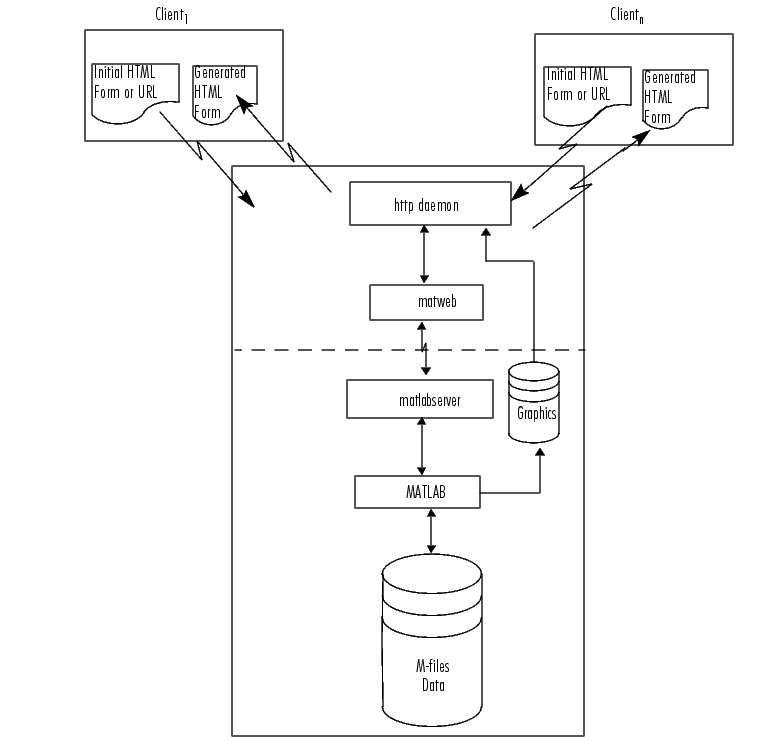
matlabserver: Manages the communication between the Web application and MATLAB.
matlabserver is a multithreaded TCP/IP server. It runs the MATLAB program (M-file) specified in a hidden field named mlmfile contained in the HTML document. matlabserver invokes matweb.m , which in turn runs the M-file.
matlabserver can be configured to listen on any legal TCP/IP port by editing the matlabserver.conf file on Windows NT or running webconf on Solaris/Linux. The number of simultaneous MATLABs is specified here.
matweb: A TCP/IP client of matlabserver. This program uses the Common Gateway Interface (CGI) to extract data from HTML documents and transfer it to matlabserver.
matweb.m: Calls the M-file that you want the Web application to run.
Two configuration files are used in conjunction with the MATLAB Web Server programs:
matweb.conf: A configuration file that matweb needs for connecting to matlabserver. Applications must be listed in matweb.conf.
hosts.conf: An optional file providing additional security. If hosts.conf is present, only listed machines can connect to the MATLAB Web Server. Machines are listed by name in a single column, e.g.,
Figure 3-1, MATLAB on the Web, is diagram showing how MATLAB operates over the Web.
File Locations
Any M-files used in conjunction with a Web application, including matweb.m, must appear on the MATLAB path. The matweb and matweb.conf files must appear under a /cgi-bin alias. Any generated graphics must be located where the Web Server can find them and programs can write them.
| | Stock Price Simulation | Understanding matlabserver | |